Core Operations Module
User Management
This module controls your staff accounts. You can create users, assign roles, choose warehouse access, activate/deactivate users, and manage user records safely from one page.
Part A: Non-Technical User Guide
1. What You Can Do Here
- Add new staff users.
- Edit user profile, role, status, and warehouse.
- Search users by name, email, or phone.
- Filter users by role and status.
- Activate/inactivate single or multiple users.
- Delete one user or multiple users.
- Export user list and copy user list data.
- View a user details pop-up.
2. Page Layout
- Top search box: find users quickly.
- Filter icon: open role/status filters.
- Action buttons: export, copy, add user.
- User table: profile image, name, role, email, phone, status, actions.
- Pagination: move across pages.
3. How To Add a New User
- Go to Users from the left menu.
- Click Add.
- Fill required fields: First name, last name, email, phone, role, status.
- Select warehouse if needed.
- Set password and confirm password.
- Click Submit.
4. How To Edit a User
- Find the user in the list.
- Click the Edit icon.
- Update needed fields.
- Click Update.
5. How To Change User Status
- Use the status toggle on a user row to activate/inactivate that user.
- For multiple users: select rows and click Set Active or Set Inactive.
6. How To Delete Users
- Single delete: click delete icon on the row.
- Bulk delete: select multiple users, then click Delete.
- Confirm the warning popup.
7. Export and Copy
- Excel/CSV button: download user list.
- Copy button: copy user data to clipboard.
- If rows are selected, export/copy uses selected rows; otherwise all visible rows.
8. Field Meanings
| Field | Meaning |
|---|---|
| First Name / Last Name | Display name for the user account. |
| Login/contact email, unique per company. | |
| Phone | Contact number, unique per company. |
| Role | Controls what user can access in system. |
| Status | Active users can log in and operate; inactive users are blocked. |
| Warehouse | Operational warehouse linked to this user where applicable. |
9. Common Problems and Fixes
| Problem | Reason | Solution |
|---|---|---|
| User save fails | Required fields missing | Fill all required fields and try again. |
| Email already taken | Email exists in same company | Use a different email. |
| Phone already taken | Phone exists in same company | Use a different phone number. |
| Password mismatch | Password and confirmation differ | Enter same value in both password fields. |
| Role not showing | Role list not loaded or role missing | Refresh page and ensure roles are configured. |
Part B: Technical Reference (For Admin/Developer)
1. Frontend Files
frontend-source/src/pages/users/User.jsx- list screen, filtering, actions, bulk operations.frontend-source/src/pages/users/components/AddUpdateUser.jsx- add/edit modal form.frontend-source/src/pages/users/components/UserDetails.jsx- user detail dialog.frontend-source/src/api/users.js- status update and delete API wrappers.frontend-source/src/slice/userSlice.js- async fetch and store state.
2. Backend File
app/Http/Controllers/Api/UserController.phpcontains list, store, update, status update, delete, and customer helper endpoints.
3. Main API Endpoints Used by Users Page
| Method | Endpoint | Use |
|---|---|---|
| GET | /api/v1/users | Load user list with pagination/filter/sort |
| POST | /api/v1/user/store | Create user |
| PUT/ANY | /api/v1/user/update/{id} | Update user |
| PUT | /api/v1/user/status | Single/bulk status update via ids[] |
| DELETE | /api/v1/user/delete/{id} | Single delete |
| DELETE | /api/v1/user/multiple-delete | Bulk delete |
4. Filters and Sorting (List API)
GET /users accepts:
searchrolestatuspageperPagesortFieldsortOrder
5. Store Validation Rules
first_name,last_name: required strings.email: required, unique inuser.emailper company.phone: required, unique inuser.phoneper company.role: required, must exist inroletable for same company.status: required.password: optional in API, min 6, max 20, confirmed.private_code: optional, min 4.warehouse_id: optional, must belong to same company.
6. Update Validation Rules
- Same as store with unique checks excluding current user id.
statusmust be0or1.thumbnailimage upload allowed (jpeg/png/jpg/gif, max 2MB).
7. Status and Delete Payloads
{
  "ids": [12, 13, 14],
  "status": 1
}
{
"ids": [12, 13, 14]
}8. Security and Data Scope Notes
- Email/phone uniqueness and role existence are company-scoped.
- Passwords and private codes are hashed before save.
- Warehouse assignment is validated against same company warehouses.
- Status update and delete operations are transactional in backend.
9. Implementation Notes
- Frontend shows action buttons by permission keys:
user.create,user.view,user.edit,user.delete. - Bulk actions rely on selected IDs from
useSelectableList. - Redux slice
fetchingUserdrives list state.
Screenshots
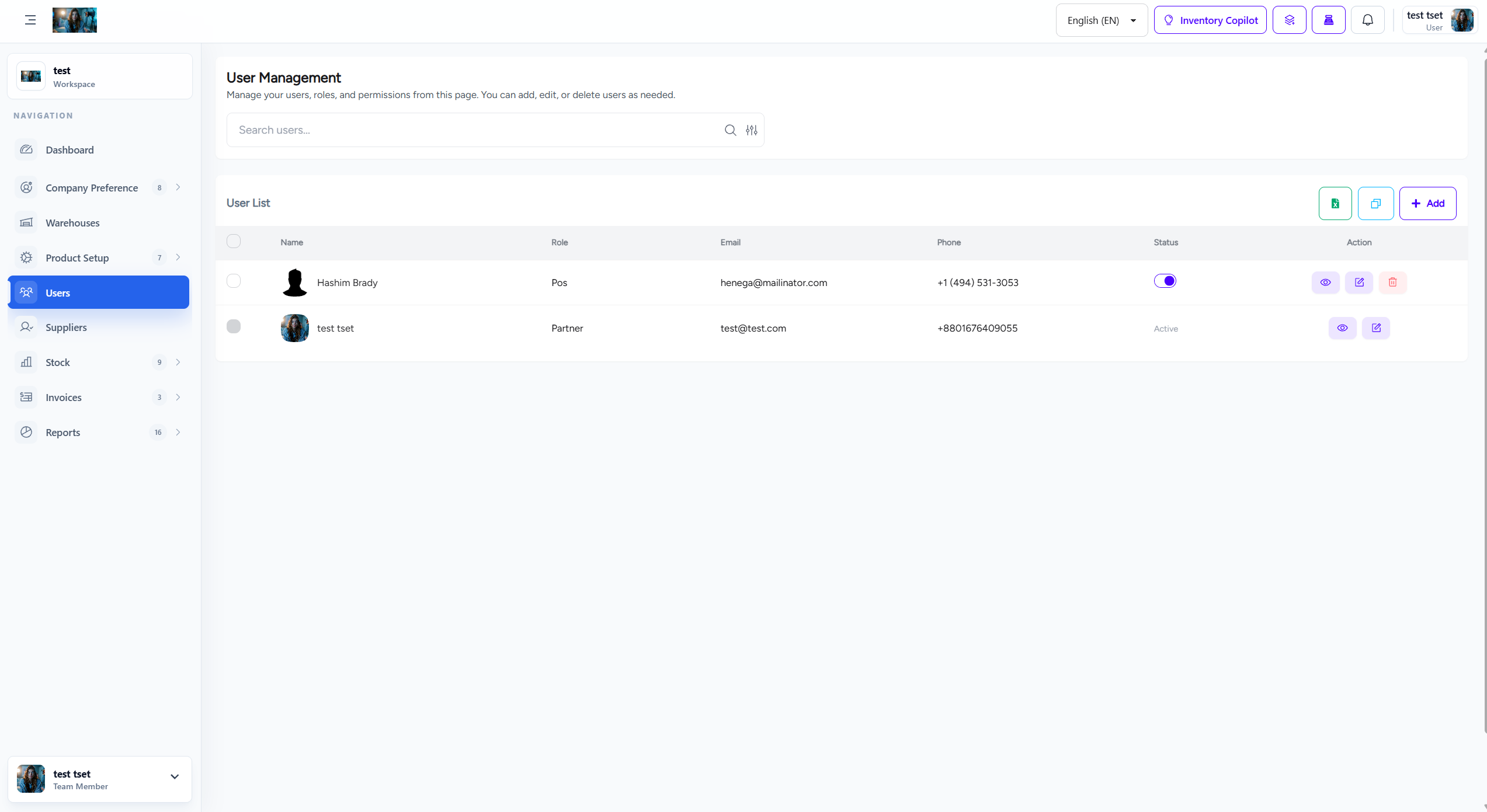
User management screen