Product Setup Module
Bundle Management
Bundle Management lets you combine multiple products into one sellable bundle with automatic pricing, discount calculation, and inventory sync.
Screen Breakdown (Based on Your UI)
- Bundle identity: Set bundle name, discount type, default sell qty, and discount value.
- Price preview panel: Shows base total, discount applied, and estimated final bundle price in real time.
- Bundle products: Add one or more products with quantity per bundle.
- Bundle status: Toggle whether the bundle stays active in product list after save.
How It Works
- User opens Bundle module and clicks Add.
- System captures bundle identity fields and selected products.
- Price preview computes base total from product prices and quantities.
- Discount is applied using percentage or fixed mode.
- On save, backend validates products, stock rules, and pricing availability.
- Bundle record is created/updated and item rows are synchronized.
- A linked sellable product and inventory row are auto-created/updated for the bundle.
API Endpoints
| Method | Endpoint | Purpose |
|---|---|---|
| GET | /api/v1/bundles | List bundles with filters/pagination |
| POST | /api/v1/bundles | Create bundle |
| GET | /api/v1/bundles/{id} | Get bundle details |
| PUT | /api/v1/bundles/{id} | Update bundle |
| DELETE | /api/v1/bundles/{id} | Delete bundle |
| GET | /api/v1/bundles/{id}/price-preview | Preview bundle total and stock feasibility |
Feature gate: bundle endpoints are guarded by feature.access:ftr_bundle_product.
Validation Rules
name: required, string, max 191, unique per companydiscount_type: required,percentageorfixeddiscount_value: required numeric, minimum 0bundle_qty: optional numeric, minimum 0.01deduction_mode: optional,strictorrelaxedis_active: optional booleanproducts: required array, minimum 1 itemproducts.*.product_id: requiredproducts.*.quantity: required numeric, minimum 0.01
Pricing Logic
- Base price per bundle = sum of (
unit_price x quantity_per_bundle) for all items. - Discount amount:
percentage =>
base_price x discount_value / 100, fixed =>discount_value. - Discount is clamped so it never exceeds base price.
- Bundle price =
max(base_price - discount, 0). - Discount share is distributed across components to compute effective component price.
Inventory and Product Sync
- Saving a bundle updates/creates a linked
productrow withis_bundle = true. - Bundle barcode/code is synchronized to the linked product SKU/barcode.
- Inventory + inventory item for the bundle product are created/updated with computed bundle price.
- On selling/preview, stock validation can ensure each component has enough quantity.
Restrictions and Safety
- Bundle cannot be saved if any selected product has no selling price.
- Deletion is blocked if the bundle was used in invoice items.
- Invalid products or over-quantity vs stock raise validation errors.
Troubleshooting
| Issue | Cause | Fix |
|---|---|---|
| Bundle save fails | Missing product selling price | Set selling price for each selected product |
| Price preview error | Insufficient component stock | Adjust quantities or replenish stock |
| Delete blocked | Bundle used in sales invoice | Keep bundle for history; create new replacement bundle |
| Unexpected total | Discount type/value mismatch | Check percentage vs fixed and recalculate |
Screenshots
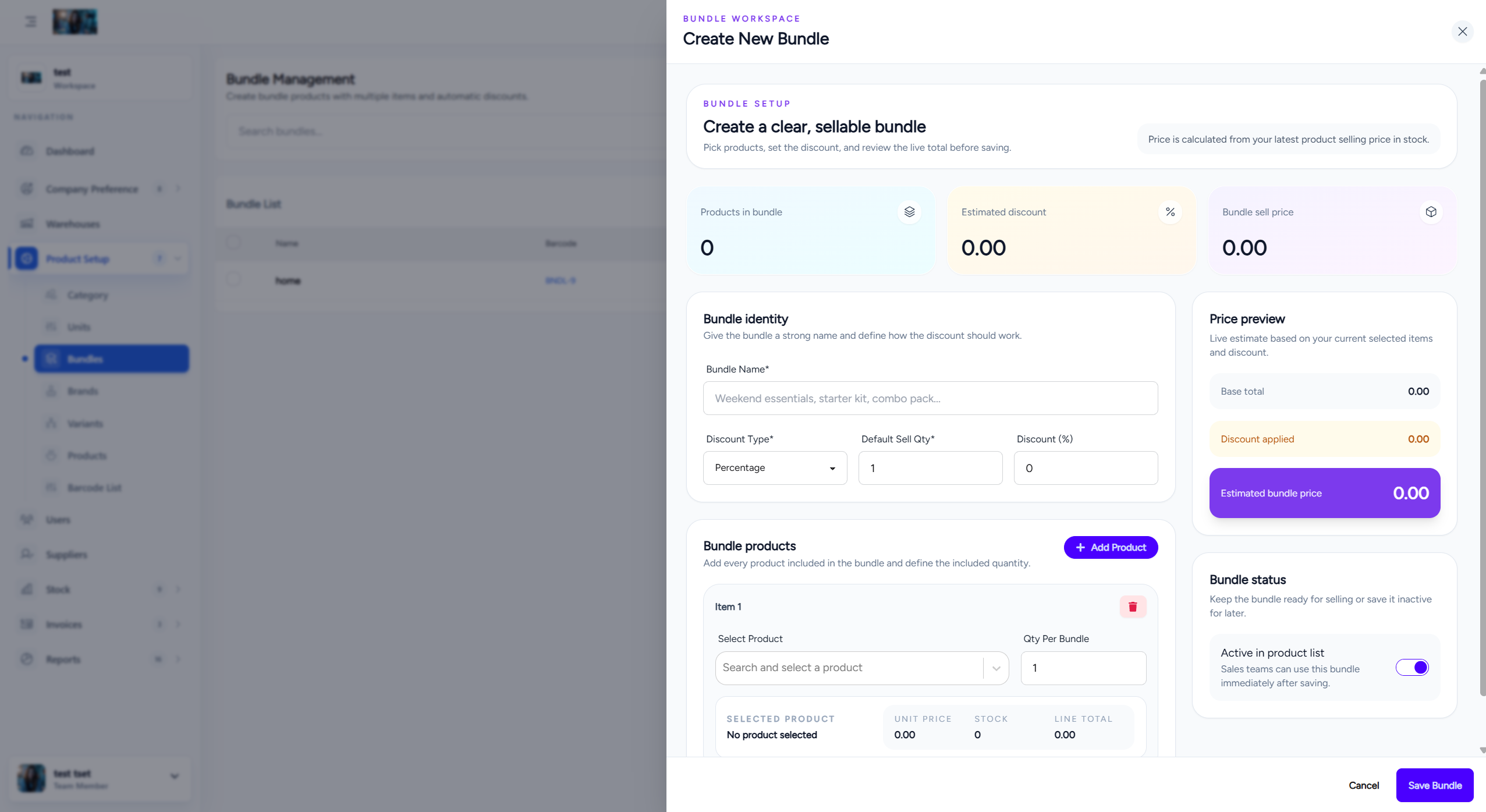
Bundle management screen