Company Preference - Feature
Feature Preference settings allow you to enable or disable specific platform features based on your business needs and subscription plan.
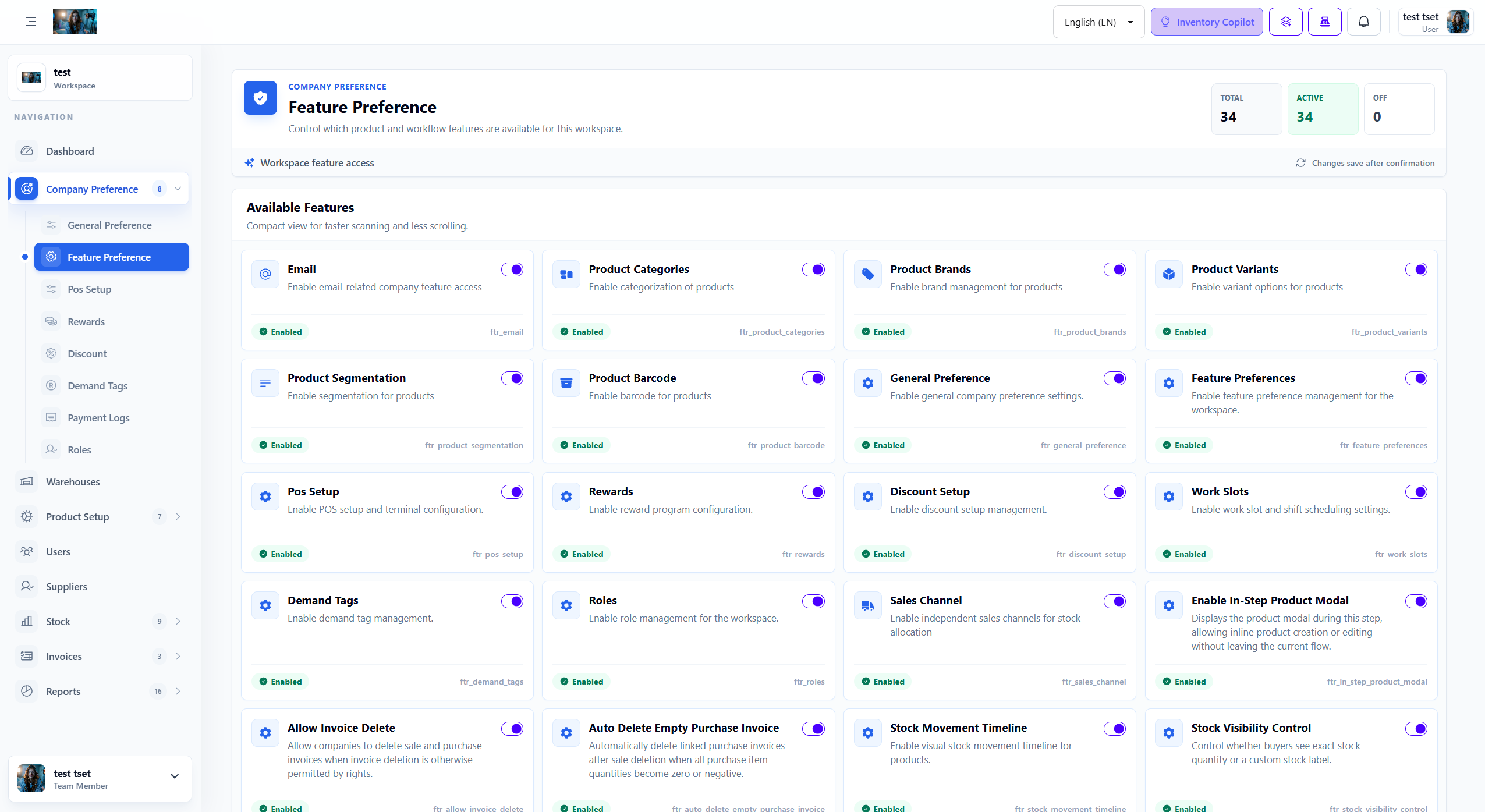
1. Overview
Feature Preferences provide workspace-level control over product, sales, inventory, and operational modules. Each switch in this screen determines whether a specific tool is available inside the company workspace, so you can keep the interface focused on the features your team actually uses.
- Workspace Control: Turn individual capabilities on or off without changing the full system setup.
- Cleaner Navigation: Disabled features are typically hidden from the menu and related forms.
- Safer Rollout: You can enable new tools only after the team is trained and the process is ready.
- Operational Flexibility: Different companies can keep different workflows active based on how they sell, stock, and manage users.
2. Available Features
The screenshot shows the following feature cards. Each one controls whether that area is available inside the company workspace:
| Feature | What It Controls | Why This Matters |
|---|---|---|
| Allows company-level email related access and workflows. | Useful when the workspace needs notifications, communication features, or email-driven actions. | |
| Product Categories | Enables product categorization so items can be grouped by type, department, or collection. | Important for filtering, reporting, and organizing a growing product catalog. |
| Product Brands | Activates brand management for products. | Best for businesses that track manufacturer, label, or house-brand information separately. |
| Product Variants | Lets products have selectable variations such as size, color, weight, or style. | Essential when one product is sold in multiple versions with separate stock or pricing. |
| Product Segmentation | Adds segmentation support for products based on internal business grouping. | Helpful when the catalog must be separated by business rules beyond standard categories. |
| Product Barcode | Enables barcode assignment and barcode-based product lookup. | Speeds up sales, stock receiving, and inventory checks in barcode-driven operations. |
| General Preference | Makes the General Preference settings area available to the workspace. | This is usually a foundational configuration area for company-wide defaults and behavior. |
| Feature Preferences | Controls access to this Feature Preference management area itself. | Allows authorized users to manage which workspace tools are turned on or off. |
| POS Setup | Enables POS setup and terminal-related configuration. | Required for businesses using counter sales, cash registers, or terminal-based checkout. |
| Rewards | Turns on reward program configuration and related customer benefit settings. | Useful for loyalty programs, repeat customer retention, and promotional incentives. |
| Discount Setup | Enables the workspace to define and manage discount rules. | Needed when pricing campaigns, promotional discounts, or manual reductions are part of sales operations. |
| Work Slots | Activates work slot and shift scheduling settings. | Helpful for operations that manage staff timing, duty slots, or scheduled coverage. |
| Demand Tags | Adds demand tag management for products or workflow categorization. | Useful when the business wants to highlight demand level, promotion potential, or stock priority. |
| Roles | Enables role management inside the workspace. | Important for permission control, team separation, and secure access management. |
| Sales Channel | Allows independent sales channels for stock allocation and selling flow separation. | Useful when the company sells through multiple channels such as retail, online, wholesale, or branch-specific streams. |
| Enable In-Step Product Modal | Displays a product modal during the current workflow step so users can create or edit products without leaving the page. | Reduces interruption during fast data entry and helps staff finish work in one continuous flow. |
| Allow Invoice Delete | Allows sale and purchase invoices to be deleted when permission rights allow it. | A sensitive setting that should be enabled only when the company accepts controlled document deletion. |
| Auto Delete Empty Purchase Invoice | Automatically removes linked purchase invoices after a sale deletion when all item quantities become zero or negative. | Helps keep records clean in workflows where reverse transactions can leave empty purchasing documents behind. |
| Stock Movement Timeline | Enables a visual timeline for product stock movement history. | Very useful for auditing, troubleshooting stock changes, and understanding how quantities changed over time. |
| Stock Visibility Control | Controls whether buyers see exact stock quantity or a custom stock label. | Important when the business wants to limit public stock visibility while still showing availability status. |
3. How to Configure Feature Preferences
Follow these steps to configure feature preferences from the workspace:
- Navigate to Company Preference > Feature Preference from the sidebar menu.
- Review the feature cards and read the short description shown under each feature name.
- Toggle the switch on the right side of a card to enable or disable that feature.
- Confirm the update when the system asks for confirmation.
- Recheck the counters such as Total, Active, and Off to confirm the current status.
- Verify that related menus or forms now appear or disappear according to the new setting.
4. Feature Dependencies
Several feature cards are connected to broader workflow setup. Keep these practical dependencies in mind:
- Product Features: Categories, brands, variants, segmentation, and barcode are most useful only after product setup is already in place.
- POS Setup: Requires POS terminals, operators, or checkout rules to be configured before day-to-day use.
- Rewards and Discount Setup: Need defined rules, campaigns, or customer logic to produce meaningful business results.
- Roles and Invoice Delete: Should be paired with strong rights management so sensitive actions stay limited to approved users.
- Sales Channel and Stock Visibility Control: Work best when your stock allocation and customer-facing display strategy are already defined.
- Stock Movement Timeline: Becomes valuable only after regular stock-in, stock-out, invoice, and adjustment activity is being recorded.
5. Best Practices
Use these practices when managing company feature access:
- Enable by Workflow: Turn on features based on the company's real process, not just because the option exists.
- Review Permissions First: Before enabling sensitive items such as role management or invoice deletion, confirm user rights and approval flow.
- Train Before Rollout: Explain new cards like sales channel, in-step modal, or stock visibility to the team before making them part of daily operations.
- Monitor Resulting Menus: After each update, check whether the expected pages, options, and actions are now visible or hidden.
- Keep It Lean: Disable modules the company does not use so the workspace remains easier to learn and operate.