v1.0.0 Stable
Companies
What This Option Does
Companies module manages all tenant businesses in the SaaS platform. Admin can create, update, and control operational access status.
How Admin Uses This
- Open Companies list and use search/filter to find target records.
- Create a company with required profile data.
- Edit company details when business information changes.
- Update status (active/inactive/suspended) and verify user access impact.
Company Management Workflow
Create Company
- Click Add Company from the Companies list.
- Enter company identity details such as company name, owner/admin name, email, phone, address, and business information.
- Select the initial status. Use active only when the company should be able to log in and use the system immediately.
- Save the company and confirm it appears in the Companies list with the correct profile and status.
- Open the company details page to assign feature permissions and right permissions before handover.
Edit Company
- Find the company from the list using search, filter, or pagination.
- Click the edit action for the selected company.
- Update only the required business, contact, or profile fields.
- Save changes and re-open the company details to verify the updated information.
- If company email, phone, or owner data changes, notify the tenant administrator so their team has the latest account information.
Give Feature Permission
- Open the target company details page from the Companies list.
- Go to the feature permission or feature preference action for that company.
- Enable the modules the company is allowed to use, such as inventory, POS, reports, rewards, demand tags, discounts, or warehouse features.
- Disable features that are not included in the company's plan or operational scope.
- Save or sync the feature permissions, then verify the tenant menu only shows the enabled features.
Give Right Permission
- Open the company details page and choose the rights or permissions action.
- Select the company-level rights that should be available to the tenant, such as product, stock, sales, purchase, report, user, and settings actions.
- Use least privilege when assigning rights. Only enable permissions the company needs for daily work.
- Save or sync rights for the company.
- Ask the tenant admin to refresh or log in again, then verify that restricted actions are hidden or blocked correctly.
Status Change
- Use the status action from the Companies list or company details page.
- Set the company to active when access should be allowed.
- Set the company to inactive or suspended when access must be blocked because of billing, compliance, support, or operational reasons.
- Confirm the status update before saving because it can affect all users under that company.
- After changing status, test login or module access with a tenant user to confirm the expected access result.
Screenshot Placeholder
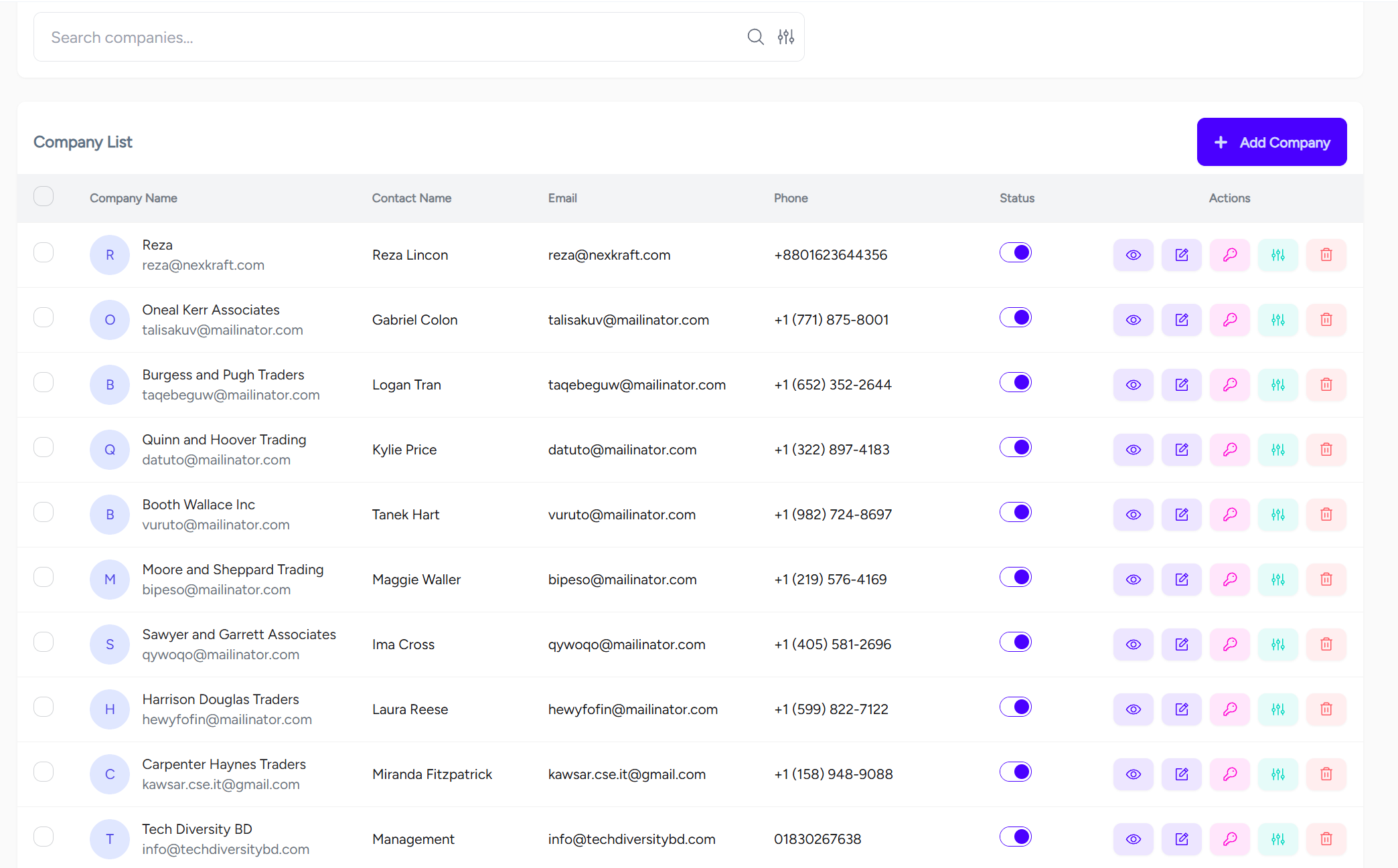
Add screenshot file at
documentaion/assets/images/backoffice-companies.pngEnterprise Technical Specification
Business Capabilities
- Company CRUD
- Status management
- Bulk status/update/delete
- Company feature permission assignment
- Company right permission assignment
API Contract Surface
Primary API endpoints used by this module:
/api/v1/backoffice/companies/api/v1/backoffice/companies/{id}/api/v1/backoffice/companies/{id}/status/api/v1/backoffice/companies/{id}/rights/api/v1/backoffice/companies/{id}/feature-preferences/api/v1/backoffice/companies/{id}/feature-preferences/sync/api/v1/backoffice/companies/multiple-delete/api/v1/backoffice/companies/status-update/multiple
Permission Blueprint
Recommended permission keys for production role design:
backoffice.company.viewbackoffice.company.createbackoffice.company.editbackoffice.company.deletebackoffice.company.status.managebackoffice.company.rights.managebackoffice.company.features.manage
Operational Risk and Control Notes
- Wrong company status impacts tenant access
- Bulk delete risk
- Enable activity logging and include
company_id, actor ID, and target entity ID in audit traces. - Apply least-privilege principle for create/update/delete actions.
QA Verification Checklist
- Validate list API load, empty-state behavior, and pagination consistency.
- Verify create/update/delete response contract (
status,message,data). - Confirm permission denial responses for unauthorized roles.
- Test edge inputs and invalid IDs for safe error handling.