Inventory Operations Module
Supplier Management
Supplier module helps you control vendor records used in purchases and supplier reports. You can add suppliers, edit details, control active status, search/filter quickly, and run bulk operations.
Part A: Non-Technical User Guide
1. What You Can Do
- Add a new supplier (name, email, phone, address, status).
- Edit supplier information any time.
- Activate/inactivate suppliers.
- Search suppliers by name/email/phone/address.
- Filter suppliers by status.
- Delete single or multiple suppliers.
- Export supplier list and copy list data.
2. Page Layout
- Search box: quick search by text.
- Filter icon: open advanced status filter.
- Top action buttons: Set Active/Inactive, Delete (bulk), Export, Copy, Add.
- Table: Name, Email, Phone, Address, Status, Actions.
- Pagination: navigate large supplier lists.
3. How to Add Supplier
- Go to Suppliers menu.
- Click Add.
- Fill required fields: Name, Email, Phone.
- Add address if needed and choose status.
- Click submit to save.
4. How to Edit Supplier
- Find supplier from list.
- Click Edit icon.
- Update fields and save.
5. How to Change Status
- Single: use status toggle in supplier row.
- Bulk: select rows and click Set Active or Set Inactive.
6. How to Delete
- Single: click delete icon for one supplier.
- Bulk: select multiple rows, then click bulk delete.
- Confirm warning popup.
7. Export and Copy
- Excel/CSV: download visible/selected supplier rows.
- Copy: copy table data to clipboard.
8. Common Problems and Fixes
| Problem | Reason | Fix |
|---|---|---|
| Cannot save supplier | Required fields missing | Provide name, email, and phone. |
| Email already exists | Duplicate supplier email | Use a unique email. |
| Status not changing | No permission or API failed | Check user rights and retry. |
| Bulk actions not visible | No rows selected | Select supplier rows first. |
Part B: Technical Reference (For Technical Users)
1. Frontend Files
frontend-source/src/pages/suppliers/Suppliers.jsx- list UI + search/filter/sort + CRUD actions.frontend-source/src/pages/suppliers/components/SupplierAddEditModal.jsx- add/edit form UI.frontend-source/src/api/supplier.js- supplier API client methods.
2. Backend Files
app/Http/Controllers/Api/SupplierController.php- list/store/update/status/delete logic.routes/api.php- supplier routes.
3. API Endpoints (Supplier Module)
| Method | Endpoint | Purpose |
|---|---|---|
| GET | /api/v1/suppliers | List suppliers with pagination/filter/sort |
| POST | /api/v1/supplier/store | Create supplier |
| ANY | /api/v1/supplier/update/{id} | Update supplier |
| PUT | /api/v1/supplier/status | Single/bulk status update with ids[] |
| DELETE | /api/v1/supplier/delete/{id} | Delete single supplier |
| DELETE | /api/v1/supplier/multiple-delete | Delete multiple suppliers |
4. List Query Parameters
searchstatuspageperPagesortFieldsortOrder
5. Validation Rules
Store
name: required, string, max 255email: required, email, unique insuppliersphone_number: required, string, max 15address: optional, string, max 255
Update
- Same as store with email unique check excluding current record id.
Status Update
ids: required array, each id must exist insuppliersstatus: required,0or1
6. Request Payload Examples
{
  "name": "ABC Supplier",
  "email": "abc@supplier.com",
  "phone_number": "01700000000",
  "address": "Dhaka",
  "status": 1
}
{
"ids": [1, 2, 3],
"status": 0
}{
"ids": [1, 2, 3]
}7. Permission Keys Used in Frontend
supplier.viewsupplier.createsupplier.editsupplier.delete
8. Integration Notes
- Supplier data is consumed in Purchase screens and Supplier Report.
- Supplier status directly impacts selectable suppliers in purchase operations.
- Consistent response shape follows
status,message,data,meta.
Screenshots
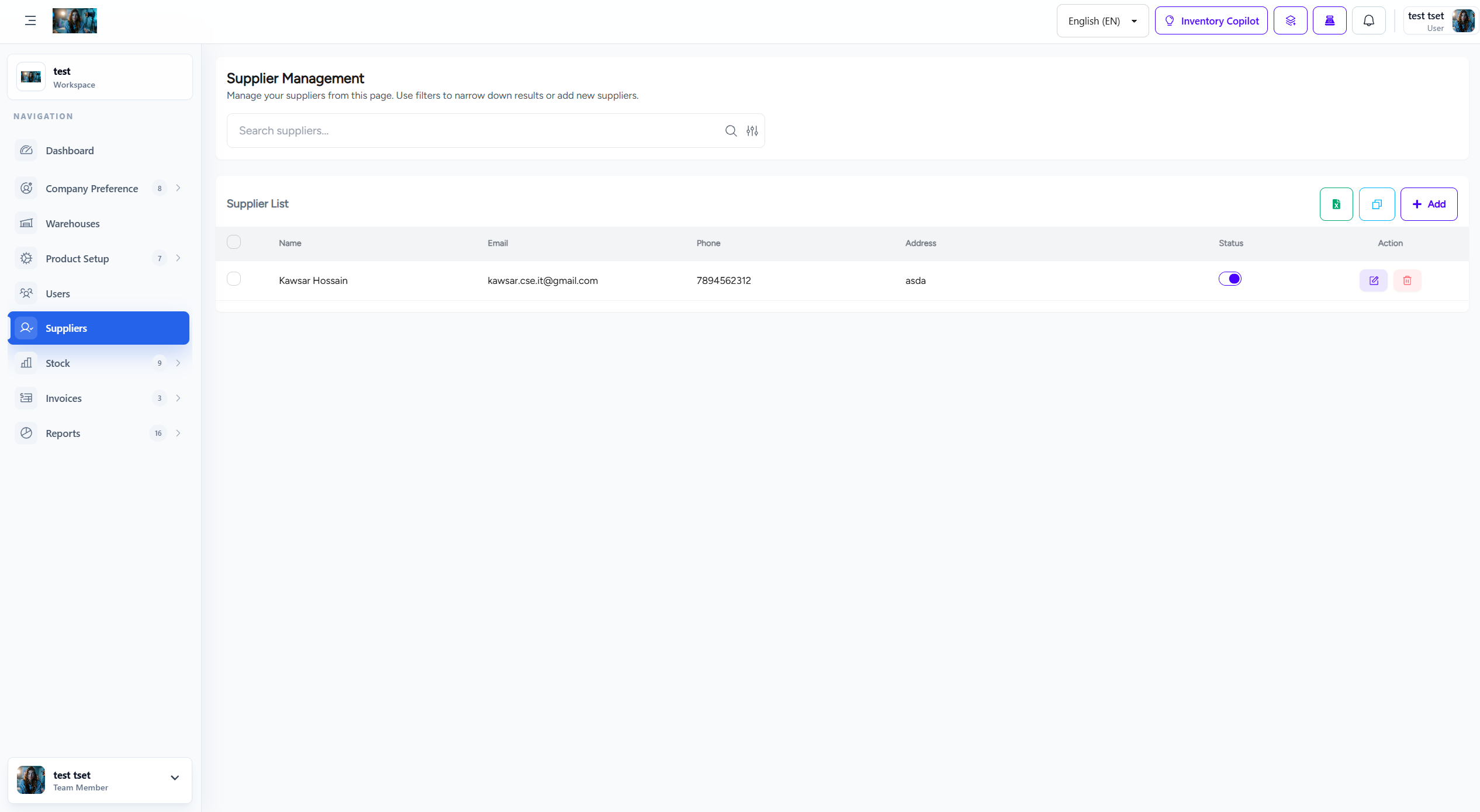
Supplier management screen